$question = urldecode ($record[0][‘_QUESTION’]);
Category: PHP
PHP – Read one array store in another associative array
$tmp[‘_DATUM’] = $resultaat->_DATUM;
$tmp[‘_LYN’] = $resultaat->_LYN;
$tmp[‘_ZJ_LID’] = $resultaat->_ZJ_LID;
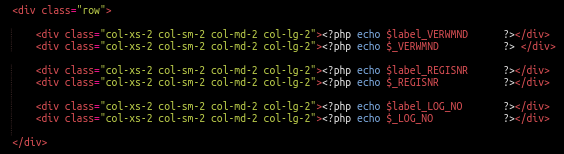
Zebra_form template with bootstrap
PHP – Convert stdClass object to array
$myUploadinfo = $upload->getUploadDetails($uploadid);
$myUploadinfoarray = json_decode(json_encode($myUploadinfo), True);
Shift array up one level
$myArray = array_shift($myUploadinfoarray);
foreach ($myArray as $key => $value) {
$fileid = $value[‘file_id’];
$result = $upload->deleteFile($fileid);
}
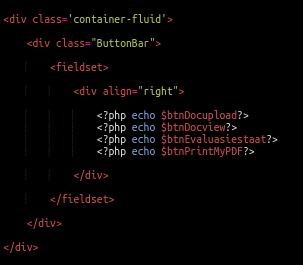
The button bar

// — btnDocupload ——————————————————————–
$obj = $form->add(‘button’, ‘btnDocupload’,'<i class=”fa fa fa-save” ></i> ’ . ‘CESUpload’);
$obj->set_attributes(array(
‘class’ => ‘btn btn-success’,
‘onclick’ => ‘docUpload()’,
‘type’ => ‘button’
));
// — btnDocview ——————————————————————–
$obj = $form->add(‘button’, ‘btnDocview’,'<i class=”fa fa fa-info-circle” ></i> ’ . ‘CESViewdocs’);
$obj->set_attributes(array(
‘class’ => ‘btn btn-info’,
‘onclick’ => ‘docView()’,
‘type’ => ‘button’
));
// — btnEvaluasiestaat —————————————————————
$obj = $form->add(‘button’, ‘btnEvaluasiestaat’,'<i class=”fa fa fa-info-circle” ></i> ’ . ‘CESStaat’);
$obj->set_attributes(array(
‘class’ => ‘btn btn-info’,
‘onclick’ => ‘statementEvaluation()’,
‘type’ => ‘button’
));
// — btnPrintMyPDF ——————————————————————-
$obj = $form->add(‘button’, ‘btnPrintMyPDF’,'<i class=”fa fa fa-print” ></i> ’ . ‘CESPrintmypdf’);
$obj->set_attributes(array(
‘class’ => ‘btn btn-info’,
‘type’ => ‘button’,
‘onclick’ => ‘printPage()’,
));
The template
PHP – Debugging
echo ‘<pre>’;
print_r($terugvoer);
echo ‘</pre>’;
PHP – SQL data stored in array passed to javascript
// — Retrieve the list of categories —————————————–
$sql = “SELECT _CATEGORY, _SUBCATEGORY FROM categories WHERE _DEPT = ‘$dept'”;
$db = new MysqliDb(‘CES’);
$selectStatus = $db->rawQuery($sql); /
if ($selectStatus > 0) {
foreach ($selectStatus as $row) {
$categoryArray[] = $row[‘_CATEGORY’];
$subcategoryArray[] = $row[‘_SUBCATEGORY’];
}
}

$(document).ready( function () {
var subcategoryArray = <?php echo ‘[“‘ . implode(‘”, “‘, $subcategoryArray) . ‘”]’ ?>;
On select
$(‘#_CATEGORY_LIST0’).on(‘select2:select’, function (e) {
$(‘#SUB_CATEGORY_LIST0’).val(subcategoryArray[e.params.data.id]);
});
PHP – serialise data for storage in MySQL
$cwarray = array($cw0, $cw1, $cw2, $cw3, $cw4, $cw5, $cw6, $cw7, $cw8, $cw9, $cw10, $cw11, $cw12, $cw13, $cw14, $cw15, $cw16, $cw17, $cw18, $cw19, $cw20, $cw21, $cw22, $cw23, $cw24, $cw25, $cw26, $cw27, $cw28, $cw29);
$upto30catw = serialize($cwarray); // MySQL field must be TEXT!!!
$sql = “UPDATE templates SET _UPTO30CATW=’$upto30catw’ WHERE temp_id=$isn”;
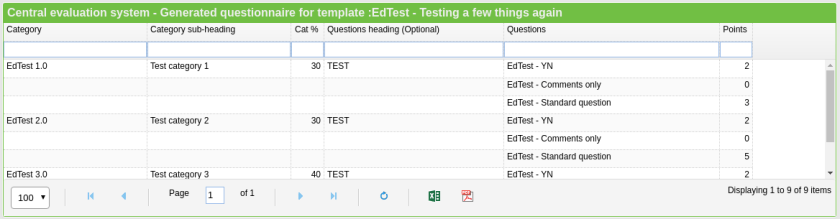
PHP – unserialise and JSON data for EasyUI
require_once($_SERVER[‘DOCUMENT_ROOT’].’/xyz/db/MysqliDb.php’);
// — Parameters input ——————————————————–
$dept = (isset($_REQUEST[‘DEPT’])) ? $_REQUEST[‘DEPT’] : ”;
$template = (isset($_REQUEST[‘TEMPLATE’])) ? $_REQUEST[‘TEMPLATE’] : ”;
// — Define containers ——————————————————-
$terugvoer = array();
$tmp = array();
// — Retrieve the present list of questions ———————————-
$sql = “SELECT _QUESTION, _YN, _COMMENTONLY FROM questions WHERE _DEPT = ‘$dept'”;
$db = new MysqliDb(‘CES’);
$selectStatus = $db->rawQuery($sql);
if ($selectStatus > 0) {
foreach ($selectStatus as $row) {
$questionArray[] = $row[‘_QUESTION’];
$ynArray[] = $row[‘_YN’];
$commentonlyArray[] = $row[‘_COMMENTONLY’];
}
}
// — Retrieve the list of categories —————————————–
$sql = “SELECT _CATEGORY, _SUBCATEGORY FROM categories WHERE _DEPT = ‘$dept'”;
$db = new MysqliDb(‘CES’);
$selectStatus = $db->rawQuery($sql);
if ($selectStatus > 0) {
foreach ($selectStatus as $row) {
$categoryArray[] = $row[‘_CATEGORY’];
$subcategoryArray[] = $row[‘_SUBCATEGORY’];
}
}
// — Retrieve the TEMPLATE selection data ————————————
$sql = “SELECT _TEMPLATE, _UPTO30CAT, _UPTO30CATW FROM templates WHERE _TEMPLATE = ‘$template'”;
$db = new MysqliDb(‘CES’);
$selectStatus = $db->rawQuery($sql);
if ($selectStatus > 0) {
foreach ($selectStatus as $row) { // Only one row ….. [0]
$tmp[‘_TEMPLATE’] = $row[‘_TEMPLATE’];
$tmp[‘_UPTO30CAT’] = unserialize($row[‘_UPTO30CAT’]);
$tmp[‘_UPTO30CATW’] = unserialize($row[‘_UPTO30CATW’]);
foreach ($tmp[‘_UPTO30CAT’] as $key=>$value) {
if ($value != ”) {
$tmp[‘_CATEGORY’] = $categoryArray[$value];
$tmp[‘_SUBCATEGORY’] = $subcategoryArray[$value];
$tmp[‘_CWEIGHT’] = $tmp[‘_UPTO30CATW’][$key];
$searchVal = $tmp[‘_CATEGORY’];
$sql = “SELECT _CATEGORY, _SUBCATEGORY, _UPTO15QSUBHEADING, _UPTO15QUES, _UPTO15PUNT, _UPTO15WEIGHTS FROM categories WHERE _CATEGORY = ‘$searchVal'”;
$db = new MysqliDb(‘CES’);
$selectStatus = $db->rawQuery($sql);
if ($selectStatus > 0) {
foreach ($selectStatus as $row) {
// — Store questions as HTML representation ——————–
foreach (unserialize($row[‘_UPTO15QUES’]) as $key=>$value) {
if ($value != ”) {
$tmp[‘myHeadingsArray’] = unserialize($row[‘_UPTO15QSUBHEADING’]);
$tmp[‘_QSUBHEADING’] = $tmp[‘myHeadingsArray’][$key];
$tmp[‘myPointsArray’] = unserialize($row[‘_UPTO15PUNT’]);
$tmp[‘_QWEIGHT’] = $tmp[‘myPointsArray’][$key];
$tmp[‘_QUESTION’] = $questionArray[$value];
$terugvoer[] = $tmp;
// ————————————
$tmp[‘_CATEGORY’] = ”;
$tmp[‘_SUBCATEGORY’] = ”;
$tmp[‘_CWEIGHT’] = ”;
// ————————————
} // End if
} // End store questions as HTML representation
} // End while
} // End of Question code
}
}
}
}
echo json_encode($terugvoer);
?>
Zebra_form – uploading multiple documents or images
require “”.$_SERVER[‘DOCUMENT_ROOT’].”/xyz/Zebra_Form/Zebra_Form.php”;
$form = new Zebra_Form(‘form1’, ‘post’, ”, array(‘autocomplete’ => ‘off’));
// — _UPLOADS_MULTI ——————————————————————
$form->add(‘label’, ‘lbl_uploads_multi’, ‘_UPLOADS_MULTI’, “CESUploads”);
$obj = $form->add(‘multiplefile’, ‘_UPLOADS_MULTI’);
$myPath1 = ‘CES’ . ‘/’ . ‘Docs’;
$obj->set_rule(array(
‘upload’ => array($myPath1, false, ‘error’, ‘errUpload’),
‘filetype’ => array(‘pdf,jpg,jpeg, png’, ‘error’, ‘errFileType’),
‘filesize’ => array(2000000, ‘error’, ‘errMaxFileSize#2000000’),
‘maxfiles’ => array(50, ‘error’, ‘lblMaxFiles#50’),
));
On Submit …..
if ($form->validate()) {
$fileUploadId = $form->getUploadId();
foreach ($fileUploadId as $key => $value)
echo ‘ storeDetail (‘ . $value . ‘); ‘;
}
$form->render(‘inl_sev_057_T_opl.php’);
 My PHP / Javascript / JQuery notes
You must be logged in to post a comment.